Online Databases With SQL Backends:
What Business Data Actually Needs
October 20, 2026

An online database with a SQL backend stores business data in real relational tables, with typed fields, primary keys, enforced relationships, and views, on a database engine such as Microsoft SQL Server that the vendor runs, giving teams a managed foundation for business applications.
That backend is the difference between a grid with a nicer interface and a database a business can run on for years. Caspio is one example: every Caspio application runs on a SQL Server data core that Caspio manages, and its AI capabilities work on that same data.
What “SQL Backend” Actually Means for Business Data
Strip away the marketing and a SQL backend gives you five things:
- Typed fields. A date is stored as a date, a currency as a currency, a yes/no as a yes/no. Sorting, filtering, and arithmetic behave because the engine knows what each value is.
- Primary keys and relationships. A primary key is the field that uniquely identifies each record. A relationship links a record in one table to records in another, so one customer record exists once, and every work order points at it instead of carrying a typed copy of the name.
- Views. A view is a saved query that joins tables and filters records, so a report can show work orders with customer and technician names side by side without copying data into a fifth table.
- Integrity rules the engine enforces. Uniqueness, referential integrity (a child record must point at a parent that exists), and typed values are checked by the engine, not left to whoever is entering data at 4:55 on a Friday.
- Performance as tables grow. A relational engine is built for large tables, with indexes and query planning designed around them, so the 40,000th row behaves like the 40th.
The managed part matters as much as the engine. On a platform, the vendor runs, patches, scales, and secures the engine. Your team designs tables, not servers.
Three Data Foundations, Compared
Most business database tools keep data one of three ways. The marketing page rarely says which, and it decides how the data behaves two years from now.
| Data foundation | Spreadsheet-style store | Document store | SQL-backed platform |
|---|---|---|---|
| How data is organized | Rows in a grid, one sheet or base at a time | Flexible records or pages, each with its own set of properties | Typed tables with primary keys on a relational engine |
| Relationships between records | Linked-record fields added on top of the grid | Links between records, with structure left to the builder | Defined relationships that the engine enforces |
| Data types and validation | Column types, with validation by formula or convention | Property types, with uniqueness and required values rarely enforced | Typed fields, with uniqueness and referential integrity enforced |
| Behavior as tables grow | Published row or record caps per sheet, base, or plan | Row and page-size limits per database | Built for large tables; the engine handles growth |
| Reporting across tables | Lookups and rollups, table by table | Filtered views of one database at a time | Views that join several tables without copying data |
| Who runs the engine | The vendor; the engine is usually undisclosed | The vendor | The vendor, with the engine named; on developer-first products, you |
| Where it stops | Several related record types and shared operational data | Operational data that needs integrity rules | Developer-first versions expect you to run the database yourself |
| Best for | A small team’s list | Notes and knowledge pages | Shared operational data with several related record types and people downstream who depend on the numbers |
The tipping point is consistent across businesses: shared operational data with several related record types, such as customers, orders, technicians, and parts, plus people downstream who rely on accurate numbers. Published caps make the limits clear. Airtable caps a base at 50,000 records on its Team plan and 125,000 on Business, counted across every table in the base. Smartsheet caps a sheet at 20,000 rows. Notion caps a database at 250,000 rows.
A SQL-backed platform is built for tables beyond those limits, with one caveat: check who runs the engine, because developer-first SQL tools expect you to provision and manage the database project yourself.
Signs Your Business Data Has Outgrown Its Current Home
Picture a field-service company’s work orders in a shared workbook: about 40,000 rows, plus Customers, Technicians, and Parts tabs, with customer names typed by hand, so one customer exists under four spellings. That workbook shows every sign at once.
- The same customer, supplier, or asset exists under several spellings.
- Formulas and color coding are your data rules.
- The file has more than one owner and no history of who changed what.
- You have hit, or are budgeting for, a row or record cap. Excel stops at 1,048,576 rows per worksheet and Google Sheets at 20 million cells per spreadsheet, and a shared file is unworkable long before either.
- IT has started asking where the data lives, who can see it, and how access is logged.
If two of these are true, it is time to rethink the foundation instead of adding another tab.
Moving Business Data Into an Online Database? 7 Questions to Ask
Before moving business data into any tool, ask these seven questions. The answers reveal whether you are choosing a durable data foundation or simply a grid with a better interface.
1. What Database Engine Is Underneath, and Who Runs It?
Strong answer: The vendor names the database engine and runs provisioning, patching, scaling, and security.
Weak answer: The vendor stays silent about the engine, or names it but expects you to run it yourself.
2. Can I Define Relationships Between Tables, and Does the Platform Enforce Them?
Strong answer: You can define one-to-many and many-to-many relationships in the table design and turn on enforcement, so a child record cannot point to a parent that does not exist.
Weak answer: The tool offers a link field that stores a reference but leaves orphaned records for you to find and fix.
3. Are Fields Typed and Validated (Required, Unique, Formats), or Is Everything Text?
Strong answer: The platform supports real field types, such as text, number, currency, date and time, yes/no, and auto-generated IDs, with uniqueness enforced by the engine and required values and formats enforced on every form.
Weak answer: Every column is text, and formulas only flag mistakes after they are saved.
4. Can I Build Views That Join Tables for Reporting Without Duplicating Data?
Strong answer: A view can join several tables with standard join types, filter records, and serve reports and apps directly.
Weak answer: The tool relies on lookups and rollups that copy values between tables.
5. How Does Data Get In: Spreadsheet Imports, Database Exports, Bulk Updates, Scheduled Imports?
Strong answer: You can import from Excel and CSV, choose whether to create a table, append, replace, or update matched records, and schedule imports from systems you already use.
Weak answer: The tool only supports paste-in data, or imports flatten relationships into text.
6. How Does Data Get Out and Connect: REST API, Webhooks, Integrations, Export?
Strong answer: The platform provides a documented REST API, webhooks that fire when records change, connectors to automation tools, and exports in standard formats.
Weak answer: The only exit path is CSV export.
7. Where Is the Data Hosted, and Who Independently Audits Security and Compliance?
Strong answer: The vendor lists hosting regions and data residency choices, supports role- and record-level security, encrypts data in transit and at rest, provides audit logs, and completes independent audits on a stated cycle.
Weak answer: The vendor offers only a privacy page and a promise.
How Caspio Answers the 7 Questions Above
A strong data foundation is easy to spot when you know what to look for. Use the same seven questions from the checklist above to evaluate Caspio: the goal is not just to confirm that a SQL backend exists, but to see how it handles relationships, validation, reporting, integration, security, and scale in practice.
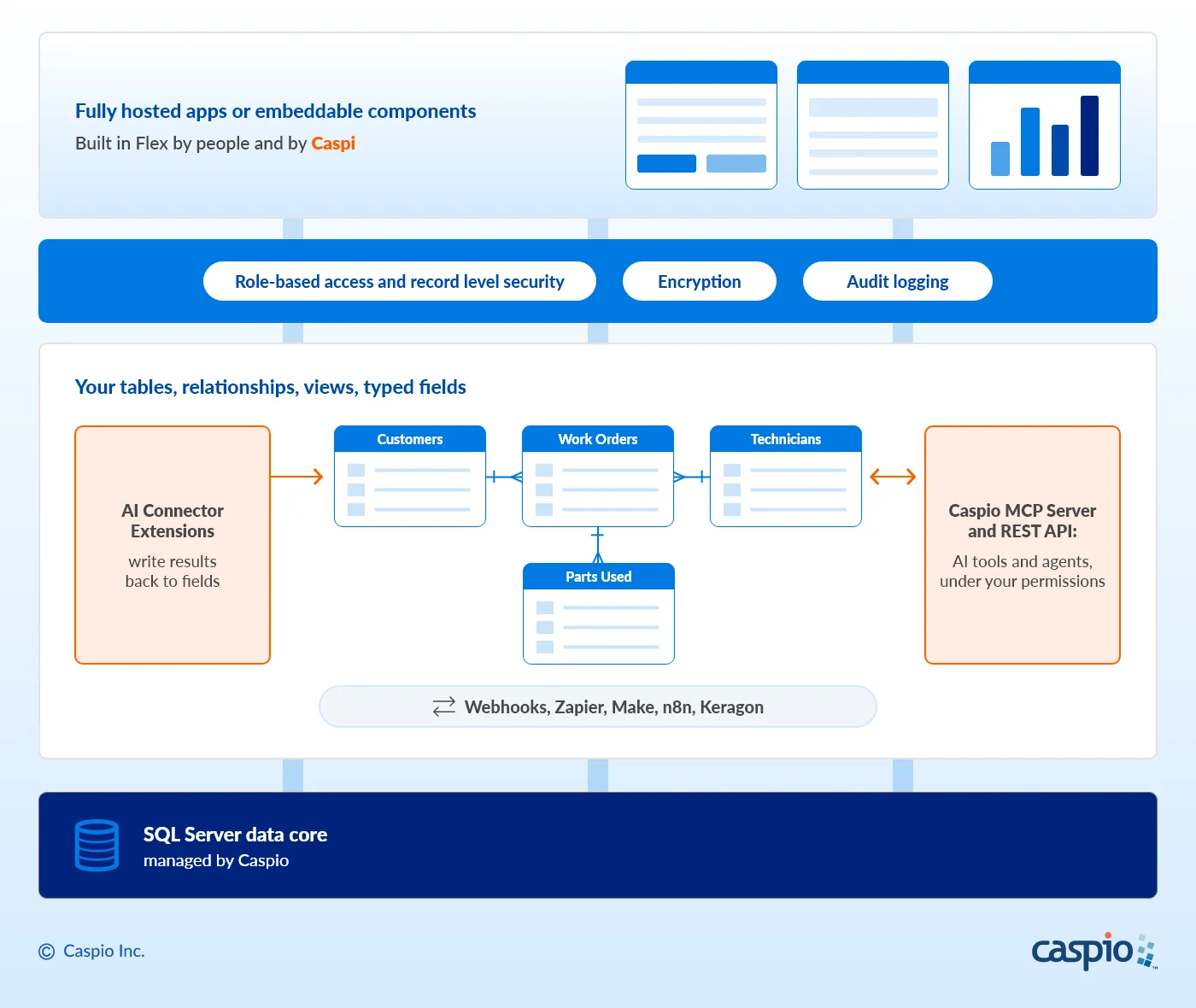
What sits under a SQL-backed platform: Caspio’s stack from the SQL Server data core up to a complete Caspio-hosted app or embeddable components, with AI working on the same tables and views.
1. Engine. Caspio’s database uses Microsoft SQL Server, and Caspio runs it: no database to provision, patch, or scale manually, and no DBA required. Caspio is an AI application platform built on more than two decades of platform engineering.
2. Relationships. You define relationships between tables in the Tables area: one-to-one, one-to-many, or many-to-many through a junction table. An “Enforce referential integrity” checkbox ensures every parent record referenced in a child table exists in the parent table, with cascade update and cascade delete as options. A display value lets the child table show the customer’s name while storing the customer’s ID.
3. Typed fields. Documented data types include Text, Number, Integer, Currency, Date/Time, Yes/No, Autonumber, Random ID, GUID, Timestamp, and Formula. Unique is a checkbox in table design; required values and formats are enforced on every form that writes to the table. Formula fields calculate a value from other fields in the same table using SQL Server expression syntax, within documented limits.
4. Views. Views are virtual tables that join up to 16 tables with inner, left outer, right outer, or full outer joins, filter records, and serve reports and forms without copying data.
5. Data in. Import Excel, CSV, tab-delimited, fixed-width text, and XML files as new tables, or use them to append, replace, or update records matched on a unique field. Scheduled import and export tasks, available on select plans, keep data refreshed from other systems. In one afternoon, the Work Orders workbook can become five related tables: Customers, Work Orders, Technicians, Parts, and Parts Used.
6. Data out and connections. A documented REST API, webhooks that send data the moment a record changes, and integrations with Zapier, Make, n8n, and Keragon for healthcare workflows. Tables and views export in Excel, CSV, and XML.
7. Hosting and audits. Hosted on AWS, with data residency in the United States, Canada, the European Union, the United Kingdom, Australia, and South America. Every application includes role-based access and record level security controls, data encryption in transit and at rest, and audit logs that track activity. HIPAA, SOC 2 Type II, and GDPR compliance are independently audited annually. Caspio is built for regulated industries and for any company that values security, reliability, and scalability.
The result is business data that becomes fully hosted applications or embeddable components, built in Flex, Caspio’s visual application builder, by people and by Caspi, with unlimited users included on every plan.
The AI Layer on Top of a SQL Backend
A SQL backend matters more now than it did 10 years ago, for one reason: AI works well on structured, governed data and badly on a workbook with four spellings of the same customer.
Caspio’s four AI capabilities all work on the same SQL Server data core:
- Caspi builds the application from a description, including the data model, interface, and roles, as a real application your team owns. People and Caspi edit the same application in the same visual builder, under the same permissions and audit trail.
- Chat AI Agent is added to a signed-in area of a Flex application by configuration. App users ask questions about the app’s data in plain language, and every answer is filtered by the signed-in user’s role and limited to the fields the designer allows. It serves app users; Caspi serves builders.
- AI Connector Extensions (OpenAI GPT, Google Gemini, and Anthropic Claude, with more on the way) run on records as they are created or updated, send the fields you choose to the model, and write the response back to a field in the same table.
- Caspio MCP Server works with structured data in Caspio tables and views directly, so any dataset you load into Caspio becomes data an AI assistant such as ChatGPT or Claude can work with, no application required. A new API profile has no permissions until you grant them, table by table and view by view. The documented REST API is the second path for AI agents.
Together, these AI capabilities turn the same governed tables and views into something more useful: apps that can be generated from a prompt, in-app answers filtered by user permissions, model responses written back to records, and AI assistant access that stays within the data permissions you define. Learn more at Caspio AI.
Frequently Asked Questions
Is a spreadsheet-style app builder a real database?
A spreadsheet-style app builder can be useful for a small team’s list, but it is not the same as a relational database. It keeps rows in a grid, adds relationships as linked-record fields, and publishes record caps per sheet, base, or plan. Shared operational data with several related record types needs enforced relationships and views that join tables, which is what a SQL-backed platform such as Caspio provides.
Can I write SQL queries in Caspio?
Caspio has no SQL console or direct database connection. It runs the SQL Server engine, and you design tables, relationships, and views visually. SQL still shows up where it counts: formula fields use SQL Server expression syntax, the documented REST API v4 accepts T-SQL expressions in record queries and supports schema discovery, and the Caspio MCP Server answers questions asked in plain language.
Can I import an existing spreadsheet into Caspio?
Yes. Caspio imports Excel, CSV, tab-delimited and fixed-width text, and XML files, as new tables or to append, replace, or update an existing table. Data from another database comes in the same way once it is exported to Excel or CSV. After import, you define relationships between the new tables in the Tables area and switch on referential integrity.
Can AI tools work with data stored in Caspio?
Yes, through four Caspio AI capabilities. Caspi builds applications on the data, the Chat AI Agent answers app users’ questions inside a Flex application, AI Connector Extensions (OpenAI GPT, Google Gemini, and Anthropic Claude, with more on the way) write model responses back to your tables, and the Caspio MCP Server lets an AI assistant work with your tables and views under permissions you grant.
Start With the Workbook You Run on Today
Start a 14-day free trial, import the workbook your team runs on today, and define the relationships that workbook could never enforce. See how AI works on that data at Caspio AI, or have us or one of our many certified partners build it for you.

Recommended Articles

Best Bolt.new Alternatives for Business Apps (2026)
READ STORY
9 Vibe Coding Security Risks in AI-Generated Apps
READ STORY
Build Custom Business Apps Easily: 3 Patterns
READ STORY
Caspio AI Connector Extensions: 5 Jobs for Your Tables
READ STORY
PHI and Caspio AI: Which Features Your BAA Covers
READ STORY
How AI Agents Buy Software, and Why Legibility Wins
READ STORY
10 Questions to Ask Before Connecting AI to Business Data
READ STORY
Add a Role-Aware AI Chat Agent to Your Caspio App
READ STORY
Build Internal Tools With AI: Best Tools for Business (2026)
READ STORY
Vibe Coding vs. Low-Code: Key Differences and Where Caspio Fits in 2026
READ STORY
Lovable Alternatives for Business and Regulated Apps (2026)
READ STORY
Vibe Coding Governance: The IT Leader’s 2026 Checklist
READ STORY
