Why Custom Inventory Software Beats Off-the-Shelf Tools for Modern Operations
June 5, 2025
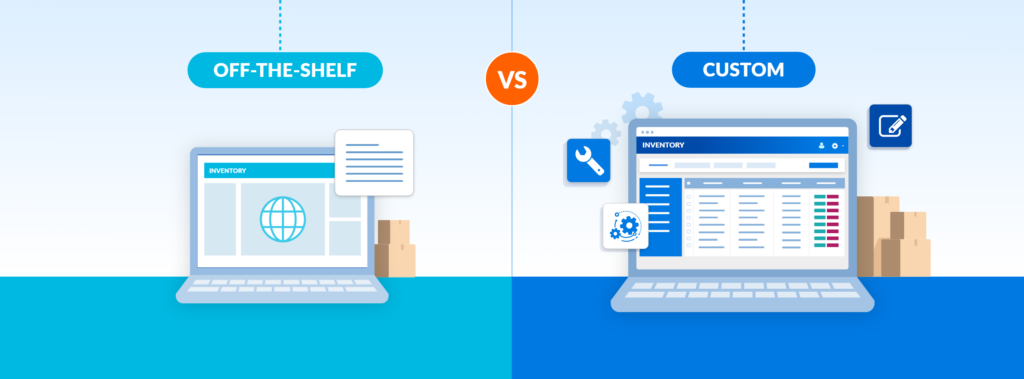
Inventory is the backbone of any product-based business. Yet despite its importance, many teams still rely on outdated tools to manage their needs.
According to Gartner Digital Markets, 41% of businesses use manual methods, while another 26% rely on spreadsheets for their day-to-day inventory operations. These approaches often lead to inefficiencies and limited functionality, prompting many teams to seek more tailored solutions.
What’s changed? The rise of low-code development has made it easier than ever to create custom inventory systems. Gartner predicts that by 2029, low-code platforms will be used for mission-critical application development in 80% of businesses globally, up from 15% in 2024. This shift empowers business and operations teams — not just IT— to take control of their systems and tailor them to real-world processes.
Inventory is at the heart of that transformation. Whether you’re tracking serialized parts, ensuring compliance or coordinating stock across locations, a custom inventory system allows you to design around your actual operations; not someone else’s assumptions.
Let’s explore why so many businesses are choosing to build their own inventory software, and how you can too, without writing a single line of code.
When Growth Outgrows Your Software

LOW CODE RISING: As operations grow more complex, businesses are outgrowing rigid tools and turning to low-code platforms to build custom solutions that scale with them.
Most companies start small — a shared spreadsheet, a whiteboard, a team member who “just knows.” But as business scales, inventory management grows exponentially more complex:
- Product lines multiply
- Operations span new teams, departments or regions
- Compliance and traceability become mandatory
- Your team outgrows the software’s user limit
Off-the-shelf software may offer quick relief; a way to get operations moving without major investment or development. It often feels like the right choice: easy to implement, familiar to use and “good enough” in the early stages.
Eventually, though, cracks begin to show:
- It only supports basic location tracking
- It doesn’t track batch numbers or expiration dates
- It requires extra user licenses just for inventory staff to access records
What was once a solution becomes a constraint. And when limitations pile up, modern businesses turn to more flexible solutions.
Build vs. Buy: The Case for Custom Inventory Systems
Most businesses don’t jump straight to “we need custom software.” It usually starts with friction — small at first, but compounding over time:
- Overselling caused by spreadsheet errors
- A delivery can’t be logged because your software doesn’t support QR codes
- Compliance issues flagged during audits
- Missed restocks during peak seasons due to poor visibility
These aren’t just hiccups; they’re signals. Indicators that your business has outgrown one-size-fits-all software.
That’s when the real question surfaces: Do we keep patching the gaps, or is it time to build something better?
The Real Value of a Custom Inventory System
With a custom system, your software is designed around your real-world needs; not generic industry assumptions. And with platforms like Caspio, custom no longer means “expensive” or “IT-only.” A custom-built system flips that dynamic. The software adapts to you.
Here’s what a low-code inventory platform makes possible:
- Localized logic, centralized visibility – A custom inventory app allows each location to run its own logic while rolling up unified reports to a central dashboard. That means individual sites can manage intake procedures, supplier relationships, naming conventions and restocking rules in the way that works best for them, without sacrificing company-wide oversight.
- Custom input methods per location – One location might use barcode scanners, while another relies on manual entry due to staffing or infrastructure differences. A custom system lets you support both, without additional user licenses or expensive add-ons.
- Tailored data fields for specific workflows – Need to track lot numbers and expiration dates at your main office but not at other hubs? Custom fields allow you to design forms and reports that reflect each location’s actual responsibilities, so no one is stuck ignoring irrelevant fields or entering fake data just to satisfy system requirements.
- Role-based access aligned with your org chart – Instead of relying on static admin/viewer roles, you can define granular permissions. Floor staff can see and update relevant stock items. Regional managers can access trend reports. Executives get high-level dashboards. Vendors or partners can even be granted controlled access to update delivery statuses or inventory counts, without seeing anything else.
Turn Operations Expertise Into Custom Inventory Workflows
Until recently, turning business-specific processes into software meant hiring developers, waiting on IT or settling for “almost-right” platforms.
Caspio changes that.

As a leading low-code development platform, Caspio enables the people who understand your inventory best to actually build the system that manages it. Whether you’re in operations, logistics or supply chain, Caspio lets you create inventory software that works exactly the way you need it to.
Here’s how:
- Visual Application Builder – Use drag-and-drop tools to create forms, dashboards, workflows and logic that match your real-world processes — no coding required. Those with technical expertise can extend the platform with custom code or integrations, on your terms.
- Cloud-Hosted Database, Real-Time Tracking – Caspio’s cloud-based database ensures inventory data is always up to date and accessible. Update stock, track shipments and manage transfers with instant visibility, so teams can make informed decisions in real-time from any location.
- Unlimited App Users Without Extra Cost – Every Caspio plan includes unlimited users, so you can involve everyone who touches inventory without racking up license fees.
- Enterprise-Grade Security and Compliance – Whether you’re managing controlled substances, serialized medical equipment or high-value components, Caspio keeps your inventory audit-ready and secure with built-in compliance features. Caspio runs exclusively on AWS and is certified for:
-
- SOC 2
- HIPAA
- GDPR
- FERPA
- PCI DSS
- Barcode and QR Code Support – Generate machine-readable labels for fast, accurate receiving, restocking and fulfillment. Use codes to streamline physical inventory checks or track products across locations and return cycles.
- AI-Enhanced Capabilities – Add smart functionality without complexity. Use AI to spot anomalies in stock levels, suggest reorder points or trigger alerts when inventory falls outside expected patterns.
- Deploy Anywhere – Launch your app on a custom domain, embed it inside your internal portal or host it on a Caspio-managed site. Wherever your team works, your system is ready to go.
Get Inspired by These Success Stories
Let’s face it: spreadsheets and off-the-shelf software often fall short. Caspio customers across industries have felt that firsthand and responded by building inventory systems tailored to their operations.
Sears Hometown and Outlet Stores

When a critical MS Access database crashed, Sears Hometown and Outlet Stores turned to Caspio to rebuild their tech stack. Using the low-code platform, they built 40+ custom apps for inventory, e-commerce and service operations, integrating tools like SMS alerts and order tracking.
Reinventors Digital
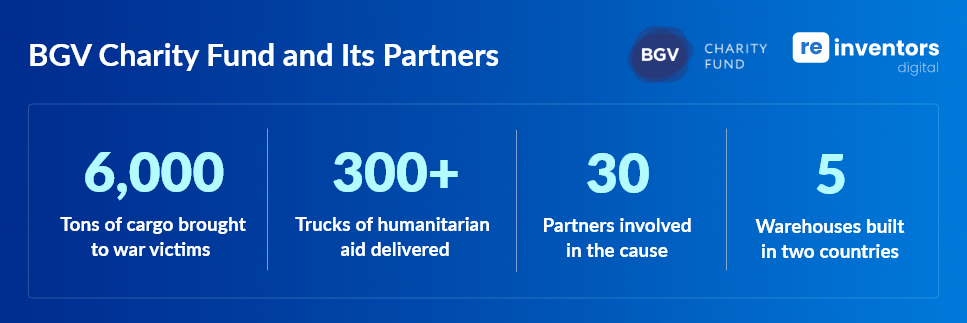
In response to the humanitarian crisis caused by the war in Ukraine, Reinventors Digital built a logistics app in just 30 days using Caspio. It connected warehouse inventory, truck dispatch, barcode scanning and real-time updates, replacing manual processes and accelerating aid delivery to families and frontline communities. The system helped deliver over 6,000 tons of humanitarian aid.
National Coating & Supplies

As a major paint distributor with over 180 locations, National Coatings & Supplies (NCS) faced serious internal challenges caused mainly by data siloes. Using Caspio, Executive Director Tim Briggs led the development of over 20 custom apps across CRM, inventory and reporting. The result? Smoother operations and major cost savings.
Inventory Software: Your Top Questions Answered
Q: What’s the difference between off-the-shelf and custom inventory software?
A: Off-the-shelf software applies generic rules across businesses. Custom software adapts to your exact workflows, offering better flexibility, control and scalability.
Q: Do I need coding experience to build with Caspio?
A: No. Caspio offers a visual app builder with drag-and-drop and point-and-click features. Advanced users can add custom scripts or integrations as needed.
Q: How secure is Caspio for inventory data?
A: Very secure. Caspio is built on AWS and supports HIPAA, SOC 2, PCI, GDPR and other industry standards, making it ideal for regulated environments.
Q: Can I manage multiple inventory locations?
A: Yes. Caspio enables location-specific workflows, user access and data visibility — all integrated into one centralized system.
Create Custom Inventory Software That Scales With You
With Caspio, you don’t have to settle for a system that almost fits. You can build one that reflects your processes and scales as you grow. Whether you’re managing hundreds of products across multiple locations or dealing with specialized inventory and regulatory demands, Caspio gives you the foundation to build exactly what you need.
Start building today. Try Caspio FREE and see how easy it is to create powerful, custom inventory software tailored to your business.

Recommended Articles

Online Database With a SQL Backend: 7 Questions to Ask
READ STORY
Best Bolt.new Alternatives for Business Apps (2026)
READ STORY
9 Vibe Coding Security Risks in AI-Generated Apps
READ STORY
Build Custom Business Apps Easily: 3 Patterns
READ STORY
Caspio AI Connector Extensions: 5 Jobs for Your Tables
READ STORY
PHI and Caspio AI: Which Features Your BAA Covers
READ STORY
How AI Agents Buy Software, and Why Legibility Wins
READ STORY
10 Questions to Ask Before Connecting AI to Business Data
READ STORY
Add a Role-Aware AI Chat Agent to Your Caspio App
READ STORY
Build Internal Tools With AI: Best Tools for Business (2026)
READ STORY
Vibe Coding vs. Low-Code: Key Differences and Where Caspio Fits in 2026
READ STORY
Lovable Alternatives for Business and Regulated Apps (2026)
READ STORY
