How to Use App Parameters to Simplify Your Caspio Apps
November 18, 2014
 Parameters are one of the most powerful features in the Caspio platform. When used properly, parameters help you create smart and efficient applications while providing a customized user experience for your end users.
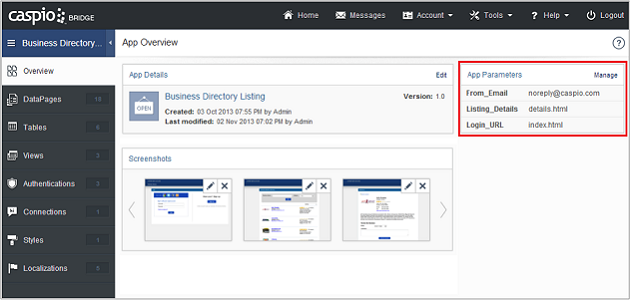
One particularly useful type of Caspio parameter is App Parameters. They make it easy to manage static information that is used repeatedly in an app. This feature allows you to define a parameter name for static values such as URLs and email addresses so you can easily manage that value throughout your application from a centralized place located on the Overview tab of each app.
App Parameters give you many benefits:
1. Create your app faster.
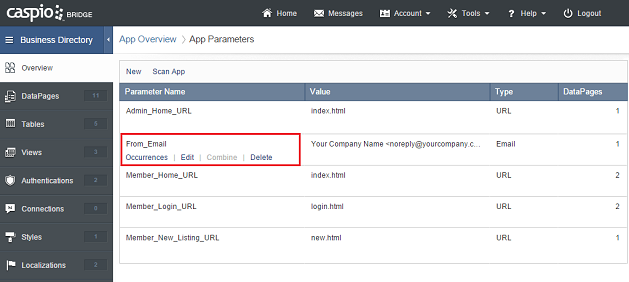
App Parameters allow you to easily change the static values across your application. And the good thing is you only need to update the value once and the change will be automatically applied to all the DataPages where that value exists. For example, if you are sending out automatic acknowledgement emails from multiple submission forms, you can easily create an App Parameter for the Sender’s email in each email message.
2. Make your app more sharable.
If you want to share or sell an application, how do you keep the same functionality while allowing others to customize certain values when needed? The answer is in App Parameters. It gives users the flexibility to clear or change any static values throughout an app without affecting the functionality or structure of the app.
3. Manage your app more easily.
On the Overview tab of an app, you’ll see a list of App Parameters for you to add, update, delete, or write a description for reference purposes. To identify the static values are already in your app, you can use the “Scan” function to locate any existing static values and configure each of them from there. And again, whenever a change is made to an App Parameter, the entire application will be automatically updated.
For step-by-step instructions on using App Parameters, read the how-to article.
To try out this feature for yourself, log in to your account or sign up for a free trial.


Recommended Articles

How AI Agents Buy Software, and Why Legibility Wins
READ STORY
10 Questions to Ask Before Connecting AI to Business Data
READ STORY
Add a Role-Aware AI Chat Agent to Your Caspio App
READ STORY
Build Internal Tools With AI: Best Tools for Business (2026)
READ STORY
Vibe Coding vs. Low-Code: Key Differences and Where Caspio Fits in 2026
READ STORY
Lovable Alternatives for Business and Regulated Apps (2026)
READ STORY
Vibe Coding Governance: The IT Leader’s 2026 Checklist
READ STORY
Shadow AI Apps Are the New Shadow IT: A 2026 Guide
READ STORY
Code Artifact vs. Governed Platform: The Two Architectures
READ STORY
AI App Builders for Regulated Industries: 2026 Buyer's Guide
READ STORY
Secure Alternatives to Vibe Coding for Business Apps (2026)
READ STORY
AI and No-Code: Generative AI in App Development
READ STORY
