Build Internal Tools With AI: The Best Tools and the Governed Way to Do It (2026)
September 17, 2026
To build an internal tool with AI, you describe the workflow and data, let AI generate a working version, then refine it with roles and security before rollout. The platform choice comes down to three criteria: what the AI produces, how users are priced, and how governance is enforced.
Most AI app builders can generate a working application from a prompt. The real difference appears after that first version: whether you receive a codebase someone must maintain or a governed native app, whether costs rise with each user who logs in, and whether roles, record-level security, and audit are built into the platform or left as policy promises. This guide starts with the build path, then gives an honest comparison of the tools.
How to Build an Internal Tool With AI in 5 Steps
These steps apply across different platforms, but the platform you choose in step 2 shapes how smoothly every later step works.
Step 1: Define the workflow and the data model
Before any prompt, write down what the tool does in one sentence (“track equipment requests from submission to fulfillment”), who touches it (requesters, approvers, admins), and what data it holds (requests, assets, locations, people). Sketch the tables and their relationships, even roughly. AI generators produce dramatically better first versions from a clear data model than from a vague feature wish, and the roles list you write here becomes your security model in step 4. Most internal tools are variations on a handful of patterns: a CRM, a tracker, a request-and-approval system, or a portal.
Step 2: Pick the platform against three criteria
Evaluate every candidate on three questions, covered in depth in the next section: Does the AI produce a code artifact or a governed native app? Is pricing per seat or flat rate with unlimited users? Is governance enforced by the platform’s architecture or left to policy and code review? For internal tools, pricing often determines long-term cost, while governance determines long-term operational risk. Answer all three before comparing feature lists; feature gaps close with iteration, but pricing models and architectures do not.
Step 3: Have AI generate the first version
Give the AI your workflow description and data model and let it build the working version: tables, relationships, forms, reports, and views. Expect 70 to 90 percent correctness, not perfection; the goal is a functional skeleton in minutes instead of weeks. On Caspio, for example, the AI builds real tables and application objects inside your account, so what you refine afterward is the production app itself, not a prototype you later rebuild.
Step 4: Refine it visually, then lock down roles and record-level security
Adjust layouts, fields, and logic, then implement the roles list from step 1: who can see which records, who can edit which fields, what gets logged. This is where the step-2 decision bites. On a governed platform, the AI-generated app and your visual refinements live in the same designer, and roles, record-level security, and audit are configuration, not code. With a code generator, every security control is code someone must write, review, and maintain for the life of the tool.
Step 5: Roll it out to everyone who needs it
An internal tool earns its keep through adoption: the field technician logging a request from a phone matters as much as the manager reading the dashboard. Roll out to every user the workflow touches, including contractors and external partners where relevant. On per-seat platforms this step has a price tag that grows with headcount, which is why so many internal tools stall at a manager-only deployment. On a flat-rate platform with unlimited users, rollout is free at the margin, and embedding the app into the intranet or website your people already use removes the last adoption barrier.
What You Are Actually Choosing Between
Three distinctions decide which tool fits. Each is a definition worth knowing before reading any vendor page.
A Code Artifact vs. a Governed Native App
A code artifact is what prompt-to-code generators produce: a codebase you must host, secure, patch, and maintain, with every access control written as code. A governed native app is what platform-based AI produces: an application living inside a platform that already provides authentication, roles, record-level security, and audit, refined in a visual designer rather than a repository. Code artifacts suit engineering teams shipping products; governed native apps suit business and IT teams shipping internal tools on real operational data. We compare the code-generator category in depth in our guide to Lovable alternatives.
Per-Seat Pricing vs. Unlimited Users
Per-seat pricing multiplies a per-user rate by everyone who logs in, so the cost of an internal tool scales with its own adoption. Unlimited users on a flat rate means the 20-person pilot and the 500-person rollout cost the same. At internal-tools scale this is usually the single largest line in the total cost of ownership, and it is covered in its own section below.
Governance by Policy vs. Governance by Architecture
Governance by policy relies on rules people follow: naming conventions, review checklists, trust that generated code implements access control correctly. Governance by architecture makes the rules properties of the platform: a user without a role cannot see the records, a change is logged whether anyone remembers to log it or not, and compliance posture is the platform’s independently audited responsibility rather than each app builder’s. For internal tools that touch customer, employee, or regulated data, architecture provides more consistent enforcement because controls are built into the platform rather than dependent on manual processes.
The Best AI Tools for Internal Business Apps in 2026
We compare six tools below, with each competitor claim checked against the vendor’s published materials or another named source as of July 29, 2026, and reviewed again quarterly.
1. Caspio
Caspio is an AI application platform, backed by more than two decades of platform engineering, built for exactly the shape of this problem: internal tools on real operational data, rolled out to everyone who needs them.
Its AI capabilities sit inside the same governed platform boundary as the apps they help create. That matters because the AI output, human refinements, integrations, and live operational data all stay in one managed environment rather than moving between a prototype, a codebase, and a production system.
Its AI stack includes several AI and integration capabilities:
- Caspi (formerly branded AI Assistant) generates tables and accelerates app building.
- AI Connector Extensions bring leading AI models into workflows for data enrichment and intelligent processing.
- Caspio MCP Server connects AI assistants such as ChatGPT and Claude to your Caspio account, so users can query, insert, update, and delete records using natural language.
- Agent-ready REST API, along with webhooks and integrations such as Zapier, Make, n8n, and Keragon, supports the broader automation and integration surface.
Because Caspi generates real tables and application objects directly inside your account, the first AI-built version is not a throwaway prototype. You refine the production app in the same visual designer, so the AI round-trip and the human round-trip happen in one place. AI capabilities are available on every plan tier.
With Caspio, governance is built into the platform: roles, record level security, and audit are configured rather than coded. Apps can run as fully hosted Caspio applications or as embeddable components on your existing site. Pricing is flat-rate, starting from $300/month, with unlimited internal and external users on every plan. There is no free plan, but Caspio offers a 14-day trial and 24/7 human support. HIPAA and SOC 2 Type II are independently certified each year, with details covered in the regulated-data section below.
Best for: Internal tools that need to reach every employee, contractor, or external partner at a flat rate, especially when the data is sensitive or regulated.
2. Retool
Retool is the developer-centric incumbent for internal tools, with genuine strengths: deep integration coverage, and Retool Assist, an AI capability that generates and edits apps which inherit the workspace’s SSO, RBAC, and permissions (retool.com, verified July 29, 2026). If you have developers who will own the tools, it is a powerful environment.
The biggest consideration is cost at scale. Retool bills every enabled user in one of three per-seat classes; on the Business plan that is $50 per builder and $15 per internal user per month on annual billing ($65 and $18 billed monthly), with tiered fees for external users beyond the first 50 (Retool’s own docs, verified July 29, 2026). Retool’s own billing documentation prices a modest 5-builder, 10-internal-user Business deployment at $4,800 up front for 12 months, and the recurring concerns are structural, such as per-user pricing at scale and enterprise-gated features. Maintenance is also developer-shaped; the power features assume someone technical owns each app. For HIPAA workloads, Retool’s guidance points customers to self-hosted deployment rather than a standard BAA (docs.retool.com, verified July 29, 2026).
Best for: Developer teams building and maintaining internal tools themselves, with a budget that can absorb headcount-scaled seats.
3. Softr
Softr’s strength is speed to simple: it assembles clean internal portals and directories on top of existing data sources quickly, with genuinely little learning curve, and it holds SOC 2 Type II and GDPR compliance (softr.io, verified July 29, 2026).
The primary limitation is scale, and it is published on Softr’s own pricing page (verified July 29, 2026): every published plan carries a hard app-user cap (10 on Free, 20 on Basic, 100 on Professional, 500 on Business, with extra-user fees in between), plus record caps (200,000 on Business) and monthly workflow-action caps. A tool that succeeds can outgrow its plan on three axes at once. Customization is more limited than a full application platform, with reduced fit for complex apps that need custom backend logic. There is no HIPAA offering and no BAA mentioned on Softr’s pricing, security, or enterprise pages (verified July 29, 2026).
Best for: Simple internal portals for a small, known user count that will stay small.
4. Glide
Glide’s strength is spreadsheet-to-app speed with polished, mobile-friendly output, and it is now competing directly on this page’s question: GlideOS, an AI builder for internal business apps, launched in beta in June 2026 (glideapps.com, verified July 29, 2026). Footer compliance shows SOC 2 Type 2, GDPR, and CCPA.
The main considerations are pricing complexity and scaling limits. Business starts at $199/month billed yearly with 30 users included, then per-user fees and per-update fees on top (glideapps.com/pricing, verified July 29, 2026), so both adoption and activity carry meters. And Glide’s own community documents the AI build path’s cost unpredictability: a June 21, 2026 forum thread on GlideOS pricing states “it’s sort of impossible to know how much your project is going to cost to build” at any point in the process. No HIPAA offering and no BAA appear on any Glide surface checked (verified July 29, 2026).
Best for: Small teams turning spreadsheets into attractive mobile tools, where user counts and usage stay modest.
5. Bubble
Bubble’s strength is flexibility: a mature visual development ecosystem that can express genuinely custom applications, and an AI generator that outputs a working visual Bubble app (pages, workflows, database schema) editable in the visual editor rather than a raw code artifact (bubble.io, verified July 29, 2026). Pricing runs from Starter at $29 to $32/month up through Team at $349 to $399/month for web apps, plus workload-unit consumption beyond plan allotments (Bubble’s docs, verified July 29, 2026).
The main limitation for regulated use cases is compliance support, in Bubble’s own words. Its SOC 2 Type II attestation covers the security principle only, and Bubble’s own documentation states that “apps built on Bubble won’t achieve HIPAA compliance,” that “Bubble cannot support HIPAA compliant apps,” and that Bubble does not recommend the platform for apps requiring HIPAA compliance; no BAA is offered at any price (manual.bubble.io, verified July 29, 2026). Governance is also per-app: roles and access rules are things each builder constructs, not platform defaults.
Best for: Custom, product-like internal apps where flexibility matters and regulated data is definitively out of scope.
6. MindStudio
MindStudio is in this list because it appears in internal-tools searches, but it is a different category: an AI-agent workflow platform, not a database-backed internal-app platform with roles and record-level security. Its strength is AI-native automation across leading models, with a $20/month self-serve tier plus AI model usage billed through at provider rates (mindstudio.ai/pricing, verified July 29, 2026).
The primary weakness is where governance lives: SOC 2 Type II, audit logs, and granular collaborator permissions are listed only on the custom-priced Business plan, while the self-serve tiers carry usage charges on top of the subscription, and no HIPAA or BAA terms are published anywhere MindStudio documents publicly (verified July 29, 2026; its enterprise page returned a 404 in the same pass). It is generally better suited for AI workflows and automations than as the system of record for a governed internal application.
Best for: Teams adding AI agents and automations alongside an app platform, not building the internal tool itself.
AI Internal Tool Builders Compared
The fastest AI builder is not always the safest or most economical choice once an internal tool moves beyond a pilot. Use the comparison below to separate tools that are strong for quick prototypes from platforms that can support governed, company-wide rollout.
| Tool | Pricing model | User limits | Governance (roles, record-level security, audit) | Compliance posture | AI build capability |
|---|---|---|---|---|---|
| Caspio | Flat rate, starting from $300/month | Unlimited users on every plan, internal and external | Roles, record level security, and audit built into the platform | HIPAA and SOC 2 Type II, annual independent certification; HIPAA add-on $500/month on top of plan rate (one-year term) | Caspi, AI Connector Extensions, Caspio MCP Server (beta), agent-ready REST API; AI capabilities available on every plan tier |
| Retool | Per-seat, three user classes; Business $50/builder and $15/internal user monthly at annual billing ($65/$18 monthly), verified 2026-07-29 | Every enabled user is billed; external users tiered beyond the first 50 | Workspace SSO, RBAC, permissions; enterprise-gated features flagged in 2026 reviews | SOC 2 Type 2 aligned; no standard BAA; HIPAA via self-hosted deployment (verified 2026-07-29) | Retool Assist generation; apps inherit workspace permissions |
| Softr | Flat tiers, $49 to $269/month published | Hard app-user caps: 10/20/100/500 by plan until custom Enterprise | Basic roles; SSO and audit logging on Enterprise only | SOC 2 Type 2 and GDPR; no HIPAA or BAA published (verified 2026-07-29) | AI app generation |
| Glide | Flat tier plus per-user and per-update fees; Business from $199/month billed yearly | 30 users included on Business, then per-user fees | Roles by plan; SSO on Enterprise | SOC 2 Type 2, GDPR, CCPA; no HIPAA or BAA published (verified 2026-07-29) | GlideOS AI internal-tools builder (beta, June 2026); community-documented build-cost unpredictability |
| Bubble | Flat tiers plus workload-unit consumption; Starter from $29 to $32/month | Not seat-priced for end users; consumption scales with usage | Built per app by the builder in the editor | SOC 2 Type II (security principle only); own docs state Bubble cannot support HIPAA compliant apps; no BAA (verified 2026-07-29) | AI generator producing an editable visual app |
| MindStudio | Freemium plus AI model usage billed at provider rates; $20/month self-serve tier | Single-user oriented self-serve; unlimited collaborators on custom-priced Business | Collaborator permissions and audit logs on custom-priced Business only | SOC 2 Type II on custom-priced Business plan; no published HIPAA/BAA terms (verified 2026-07-29) | AI agent and workflow builder, not an app builder |
All competitor figures from vendors’ published pages as of July 29, 2026, re-verified quarterly. Pricing models change; check the vendor’s live page before purchase.
The Economics of Internal Tools at Unlimited-User Scale
Internal tools are unusual because user growth is often the goal. The more users adopt the tool, the more important the pricing model becomes. A request tracker that only managers can open is a reporting tool. The moment you commit to rolling a tool out to everyone the workflow touches, the pricing model becomes the largest line in the build-vs-buy math.
Run the named numbers. On Retool’s published Business rates ($50 per builder, $15 per internal user per month, annual billing, verified July 29, 2026), a 200-person rollout with 5 builders and 195 internal users comes to $3,175 per month, $38,100 per year, for one tool, before any external users beyond the free tier. Retool’s own docs price even a 15-person deployment at $4,800 per year up front. Softr’s published plans cap out at 500 app users; Glide’s Business plan includes 30 users and then charges per user. None of this is hidden; it is the pricing model working as designed. As adoption grows, so do cost.ms on per-seat pricing models.
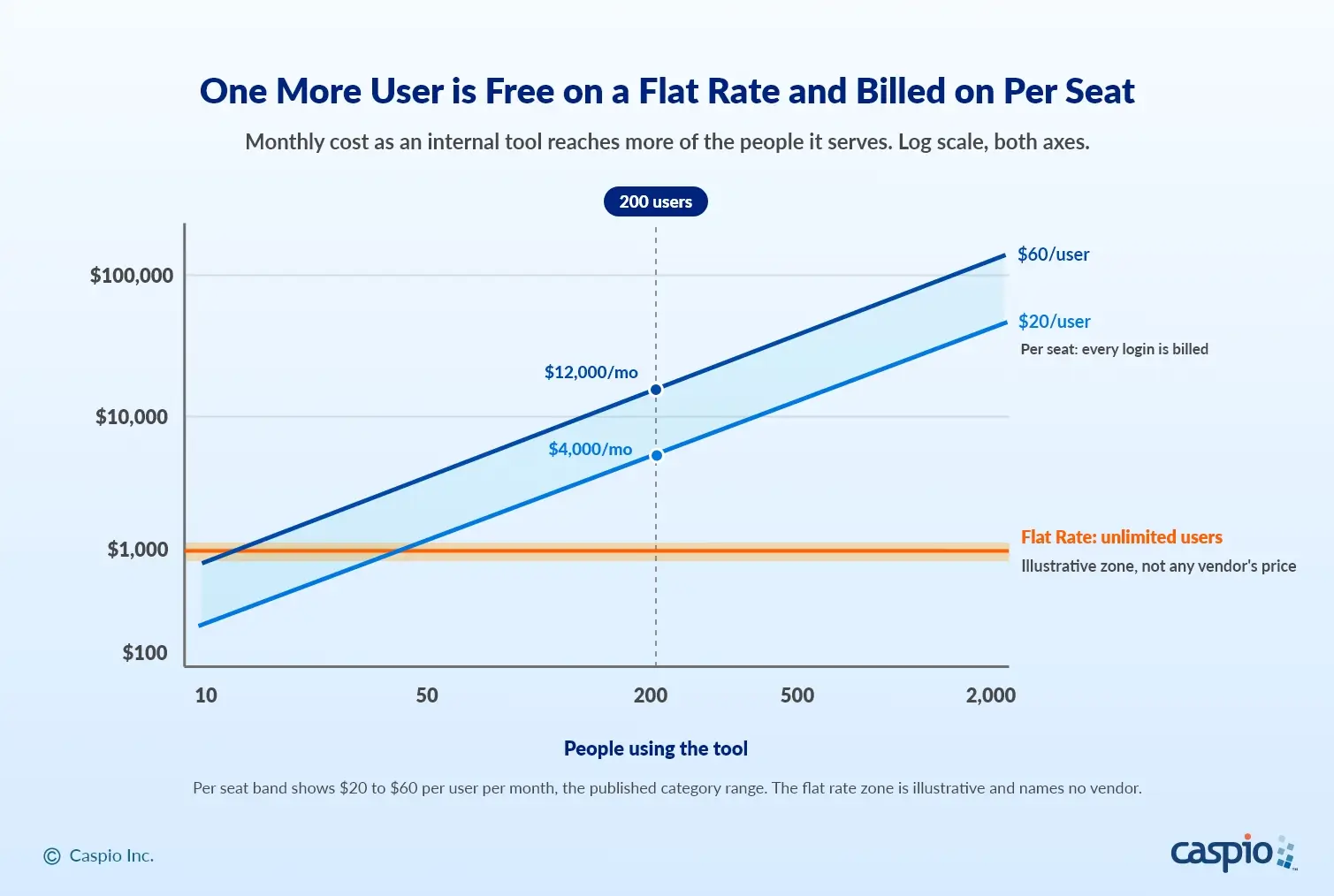
The per-seat band reflects a published category range of $20 to $60 per user per month at annual-billing rates, shown as categories rather than brands; the flat-rate zone is illustrative and is not any vendor’s published price. Monthly cost, log scale on both axes.
A flat-rate platform inverts the math. Caspio starts from $300/month with unlimited users on every plan, so the 20-person pilot, the 200-person rollout, and the vendor portal with 2,000 external accounts all run at the same rate. That is the build-vs-buy pivot: at internal-tools scale, the per-seat bill for the rollout will often exceed the cost of building the tool yourself on a flat-rate platform, and the flat-rate build is the version where success does not reprice the project. The full per-seat cost curve, including minimum-seat floors and renewal dynamics, is in our deep dive on unlimited users and pricing models.
The third pricing model deserves its own warning. Consumption-priced AI build tools bill by usage rather than seats, and the forecasting record is poor: Gartner’s Predicts 2026 report forecasts that by 2027, 40% of enterprises using consumption-priced AI coding tools will face unplanned costs exceeding twice their expected budgets (as reported by ArmorCode). Glide’s own community thread on GlideOS pricing is the pattern in miniature: cost you cannot predict until the build is done.
We break down the delayed-invoice pattern in The Hidden Costs of “Free” AI App Builders. When you evaluate any AI build path, ask one question of the pricing page: what does this cost at the user count and usage level where the tool has succeeded?
When the Internal Tool Touches Regulated Data
Many internal tools do: patient intake trackers, employee health records, incident logs, claims queues. The formula is simple, and it is a pre-gate, not an afterthought: AI builds it; the platform it lives on carries annually certified HIPAA and SOC 2 Type II. Ask three questions before the first prompt. Does the vendor sign a BAA at a published price? Is the compliance posture independently certified on an annual cycle, not self-attested? Do roles, record-level security, and audit live in the platform’s architecture?
Bubble’s own documentation states it cannot support HIPAA compliant apps. Retool routes HIPAA to self-hosting with no standard BAA. Softr, Glide, and MindStudio publish no HIPAA or BAA terms at all (all verified July 29, 2026). Caspio’s HIPAA and SOC 2 Type II compliance carries annual independent certification, HIPAA is available as a $500/month add-on on top of your plan rate (one-year term), making a HIPAA-enabled deployment available from $800/month total (TEAM plan plus add-on), and Caspio’s HIPAA-eligible AI features operate under signed Business Associate Agreements. For the full evaluation framework, see our guide to AI app builders for regulated industries; for a healthcare-specific tool list, see the best HIPAA-compliant app builders in 2026.
Frequently Asked Questions
What is the best way to build internal tools with AI?
Define the workflow and data model first, then pick a platform against three criteria: whether the AI produces a code artifact or a governed native app, whether pricing is per seat or flat rate with unlimited users, and whether governance is enforced by platform architecture. Then let AI generate the first version, refine it visually with roles and record-level security, and roll it out to everyone the workflow touches.
Can AI build an internal tool without developers?
Yes. On platform-based builders, AI generates the tables, forms, and reports from a plain-language description, and refinement happens in a visual designer rather than code, so operations and IT teams can own the tool end to end. Code-generating tools also build without developers up front, but the output is a codebase that needs developer maintenance for hosting, security, and changes over its life.
What does it cost to build internal tools with AI?
It depends on the pricing model more than the tool. Flat-rate platforms charge one price regardless of user count; Caspio starts from $300 per month with unlimited users on every plan. Per-seat platforms scale with headcount; for example, Retool’s published Business rates of $50 per builder and $15 per internal user per month put a 200-person rollout near $38,000 per year. Consumption-priced tools bill by usage, and Gartner’s Predicts 2026 report forecasts that by 2027, 40% of enterprises using consumption-priced AI coding tools will face unplanned costs exceeding twice their expected budgets.
Can AI-built internal tools be HIPAA compliant?
Yes, if the platform the tool lives on carries the compliance. Check three things: the vendor signs a Business Associate Agreement at a published price, the HIPAA and SOC 2 Type II posture carries annual independent certification, and roles, record-level security, and audit are enforced by the platform architecture. Caspio meets all three, and Caspio’s HIPAA-eligible AI features operate under signed Business Associate Agreements. Several popular builders do not offer a BAA at any price, and Bubble’s own documentation states it cannot support HIPAA compliant apps.
What are the best Retool alternatives with AI?
It depends on who maintains the tool and how many people use it. Caspio is the strongest alternative for business and IT teams: AI-assisted building on a governed platform, flat-rate pricing starting from $300 per month, and unlimited users, where Retool bills every enabled user per seat. Softr and Glide suit smaller, simpler tools within their published user caps. Bubble fits custom app builds where regulated data is out of scope.
Start With a Working Pattern
Want to test the build path in this guide? Apply it to your own workflow: start a 14-day free trial and let AI generate your first internal tool from your own data, or begin with one of Caspio’s pre-built app templates and adapt it to your workflow.
Flat-rate plans with unlimited users start at $300/month on the pricing page, so your full rollout costs the same as this week’s pilot.

Recommended Articles

How to Build Internal Apps With AI in 2026: 6 Steps
READ STORY
Best Bolt.new Alternatives for Business Apps (2026)
READ STORY
Online Database With a SQL Backend: 7 Questions to Ask
READ STORY
9 Vibe Coding Security Risks in AI-Generated Apps
READ STORY
Build Custom Business Apps Easily: 3 Patterns
READ STORY
Caspio AI Connector Extensions: 5 Jobs for Your Tables
READ STORY
PHI and Caspio AI: Which Features Your BAA Covers
READ STORY
How AI Agents Buy Software, and Why Legibility Wins
READ STORY
10 Questions to Ask Before Connecting AI to Business Data
READ STORY
Add a Role-Aware AI Chat Agent to Your Caspio App
READ STORY
Vibe Coding vs. Low-Code: Key Differences and Where Caspio Fits in 2026
READ STORY
Lovable Alternatives for Business and Regulated Apps (2026)
READ STORY
